

Kind Overview
Kind (Kubernetes in Docker) runs Kubernetes clusters on a single host by placing each Kubernetes node inside a Docker container. Every container runs systemd, containerd, kubelet and kubeadm; together they form a complete cluster that behaves like upstream Kubernetes.
Kind is maintained by Kubernetes SIG Testing. It began as a way to test Kubernetes itself and is now widely used for local development, CI and multi-node behaviour validation. It is a CNCF-certified conformant Kubernetes installer, but it is not a CNCF-hosted project. The former means clusters created by Kind can pass upstream conformance tests; the latter concerns governance. The two should not be conflated.
Design goals
Kind addresses consistency and reproducibility for local Kubernetes environments. Four design choices follow from that goal:
- Clusters are made of containers: no virtual machines, cloud hosts or external nodes; every node is a local Docker container.
- Versions are fixed by images: the Kubernetes version comes from the
kindest/nodeimage, avoiding drift caused by host tooling. - Topology is declared in configuration: node count, roles, port mappings and kubeadm parameters live in a cluster config that can be versioned with code.
- Lifecycles are disposable: creation and deletion are explicit commands, making it practical to provision an isolated cluster for every CI job.
These choices define the boundary: Kind targets testing and development, not production.
Architecture
Kind can be understood as four layers: the host Docker engine, the Docker network, the node containers, and the Kubernetes components and workload Pods inside each node.
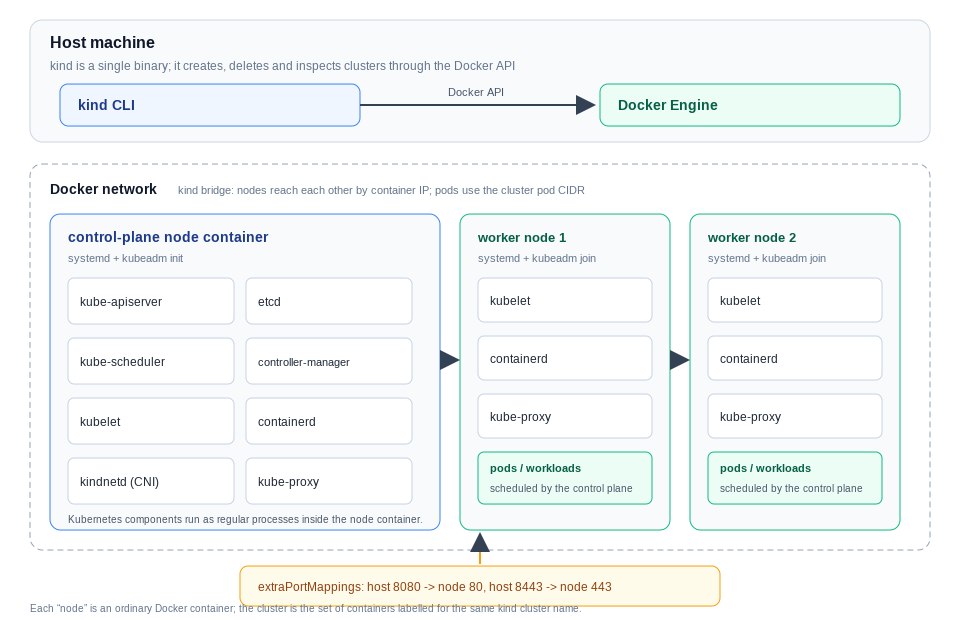
| Object | Description |
|---|---|
kind CLI | Management entry point. A single Go binary that creates, starts, inspects and deletes node containers through the Docker API. |
| Cluster | Cluster instance. A set of node containers sharing the same kind labels, identified by --name. |
| Node container | Node carrier. A Docker container running systemd and Kubernetes components, with a control-plane or worker role. |
| Node image | Version carrier. kindest/node:vX.Y.Z, preloaded with a specific Kubernetes release. |
| Cluster config | Topology declaration. kind.x-k8s.io/v1alpha4 YAML describing nodes, networking, port mappings and kubeadm patches. |
| Docker network | Node network. The bridge network created by Kind, assigning node IPs and carrying inter-node traffic. |
| kubeconfig | Access configuration. Host-side credentials whose context is named kind-<cluster>. |
Two meanings of "node" need to be kept apart: a Kubernetes Node is the logical object in the cluster, while a Kind node container is the Docker container that hosts it. kubectl get nodes shows the former; docker ps shows the latter.
How it works
Cluster creation
When kind create cluster runs, Kind initialises the cluster in this order:
- Read the cluster config to determine node count, roles, images, networking and port mappings.
- Create node containers through the Docker API and attach them to the Docker network managed by Kind.
- Wait for the containers to reach a bootable state, then finish mounts, kubeconfig writes and image preloading.
- Run
kubeadm initon the first control plane,kubeadm join --control-planeon additional control planes, and a regularkubeadm joinon workers. - Install the default CNI and StorageClass, then merge kubeconfig into the host configuration.
- Once ready, the cluster is reached with
kubectl --context kind-<cluster>. On deletion, Kind removes every node container and the network by label.
In terms of responsibility, Docker supplies the node carrier, kubeadm bootstraps the cluster, and kubeconfig returns access to kubectl on the host.
Inside a node container
kindest/node is not an ordinary application image. It contains a node root filesystem with systemd boot capability, a container runtime and the Kubernetes components. Startup has four phases:
- Prepare: the entrypoint pauses while Kind completes mounts, configuration writes and image preloading.
- Boot init: after the start signal,
systemdbrings upcontainerdandkubelet. - Form the cluster: control planes run
kubeadm initorkubeadm join --control-plane; workers runkubeadm join. - Install add-ons: apply the default CNI and StorageClass, then export kubeconfig.
As a result, a Kind cluster has two observation planes: Docker shows containers such as kind-control-plane and kind-worker, while Kubernetes shows the Nodes registered inside those containers.
Networking
Kind networking has three layers:
- Node network: Kind creates a Docker bridge network named
kind. Each node container receives an IP and nodes communicate through this network. - Pod network: a separate Pod CIDR,
10.244.0.0/16by default, connected bykindnetd. - Service network:
10.96.0.0/12by default, with forwarding rules maintained bykube-proxy. Kind uses iptables mode by default; nftables is available from Kubernetes v1.31.
There are three paths from the host into the cluster:
| Path | Use case | Mechanism |
|---|---|---|
| API server | kubectl, CI, remote debugging | Kind maps the API server to the host, so kubeconfig works directly |
| Port mapping | NodePort, Ingress, fixed-port services | Declare extraPortMappings to map a host port to a node container port |
| Temporary forwarding | Local development, one-off checks | Use kubectl port-forward without changing cluster configuration |
On macOS and Windows, Docker runs inside a virtual machine and node container IPs are not routable from the host. Workload access must therefore use port mappings or port-forward. Node IPs may be reachable on Linux, but port mappings remain preferable for cross-platform consistency.
Images and storage
Image distribution
Kind nodes run their own containerd, isolated from the host Docker image store. Images produced by docker build do not appear in the nodes automatically; they must be loaded explicitly:
docker build -t kind-demo:v1 ./app
kind load docker-image kind-demo:v1 --name kind-multi
By default, kind load docker-image imports the image into every node, so a Pod can use the local copy wherever it is scheduled. If only some nodes are loaded, node affinity or fixed scheduling must ensure the Pod lands on a node that has the image.
Image tags should be fixed. Kubernetes defaults to Always for :latest, which bypasses the local copy and contacts a registry. Workload manifests should also set imagePullPolicy: IfNotPresent so the node prefers its local image.
Persistent storage
Kind installs local-path-provisioner and creates a default StorageClass named standard. PersistentVolumes live on the local filesystem of a node container by default; mounting that path to a host directory with extraMounts writes the data to the host, so files survive a container stop and start or a container recreation. The default storage provides no cross-node sharing.
Two limitations follow:
- A PersistentVolume is bound to one node. A Pod using a PVC may not see the original data after being rescheduled to another node.
- Deleting the cluster deletes node containers and their local data; if the storage path is mounted to a host directory with
extraMounts, the files remain on the host, but a new cluster does not automatically recognise the old PVC.
Stateless workloads should prefer emptyDir or no volume at all. When testing a StatefulSet, accept that data is node-local, or pin the Pod to the same node with affinity.
Multi-node and high availability
Kind supports multi-node and multi-control-plane topologies:
- One control plane plus workers: the usual development and CI shape, used to validate scheduling, affinity, rolling updates and cross-node networking.
- Three control planes plus workers: an HA-like layout. Each control plane runs an etcd member and together they form a quorum; Kind starts an additional load balancer container to distribute API server traffic across surviving control planes.
Kind removes the control-plane NoSchedule taint by default, so a single-node cluster can run workloads immediately. In a multi-node environment, restore the taint when workloads should run only on workers.
Lifecycle
Kind keeps cluster state in Docker containers and their labels rather than a separate cluster directory on the host. The common lifecycle commands are:
kind create cluster --name <cluster>: create a cluster;--imagepins the node image.kind get clusters: list all local clusters.kind get nodes --name <cluster>: list the node containers of a cluster.kind export kubeconfig --name <cluster>: re-export kubeconfig.kind delete cluster --name <cluster>: remove node containers, the Docker network and the matching kubeconfig entry.
Kubeconfig is merged into ~/.kube/config by default, with a context named kind-<cluster>. When several clusters exist, pass --context explicitly to select the intended one.
Limitations
Kind targets local testing and development. The following limits come from its implementation, not from configuration:
- Not a multi-host cluster: all nodes share one host, one kernel and one Docker resource pool, so real cross-machine failure domains cannot be modelled.
- No cloud-provider capabilities: there is no LoadBalancer implementation by default. A
type: LoadBalancerService receives no external IP unless an additional component is installed; NodePort or Ingress is the usual alternative. - Storage is not shared: the default StorageClass is node-local, and data does not follow a Pod to another node.
- Resources are bounded by Docker: the CPU and memory limits of Docker Desktop are the limits of the whole cluster. Multi-node clusters and image builds should have at least 8 GB of memory.
- Not a security boundary: node containers share the host kernel; untrusted workloads should not run there.
- Image architecture must match: Apple Silicon builds arm64 images by default, and the node image must also be arm64. Cross-architecture builds require an explicit
--platform.
Common pitfalls and their fixes:
| Pitfall | What happens | Fix |
|---|---|---|
| Deploy immediately after building an image | The image is absent in the nodes and Pods report ErrImagePull | Run kind load docker-image first |
Use the :latest tag | The default Always policy ignores the local image | Use a fixed tag and IfNotPresent |
| Reach node IPs directly from macOS | Nodes sit inside a Docker VM and are not routable | Use extraPortMappings or port-forward |
| Treat Kind as a production cluster | Single host, no failure domains, no cloud integration | Reserve it for development, tests and CI |
| Expect data to survive cluster deletion | Node containers and local volumes are removed; without a host mount the data disappears with the container | Mount a host directory with extraMounts, or use external storage |
Choosing among local tools
Local Kubernetes tools differ in node shape, whether they run upstream Kubernetes, and how complete their built-in components are:
| Tool | Node shape | Best for | Main limitation |
|---|---|---|---|
| Kind | One Docker container per node; multi-node supported | Testing upstream Kubernetes, CI, multi-node behaviour | No built-in Ingress, LoadBalancer or dashboard |
| Minikube | Mostly single node; some drivers support multi-node | Learning, daily development, official add-ons | Heavier startup; multi-node support depends on the driver |
| k3d | One container per node, running k3s | Lightweight multi-node environments, edge or constrained machines | Runs the k3s distribution, which differs from upstream Kubernetes |
| Docker Desktop Kubernetes | One built-in node | Docker Desktop users who want a quick trial | Single node, limited options, unsuitable for multi-node validation |
Choose by objective:
- Use Kind to validate upstream Kubernetes behaviour, run multi-node scheduling experiments or build CI environments.
- Use Minikube for a ready-made learning environment that relies on Dashboard, Ingress and other add-ons.
- Use k3d when a lighter multi-node cluster is needed and k3s differences are acceptable.
- Use Docker Desktop Kubernetes for a zero-configuration trial inside Docker Desktop.
Kind's value lies in matching the node shape of upstream Kubernetes and reproducing clusters from a declaration, which makes it suitable for testing node changes, taint adjustments and scheduling policies.
Versions and references
Kind v0.33.0 ships kindest/node:v1.37.0 as its default node image and also supports v1.36.4, v1.35.8 and v1.34.11. Kind releases and supported node images are listed in the official release notes; cluster configuration fields are documented in the official configuration guide.